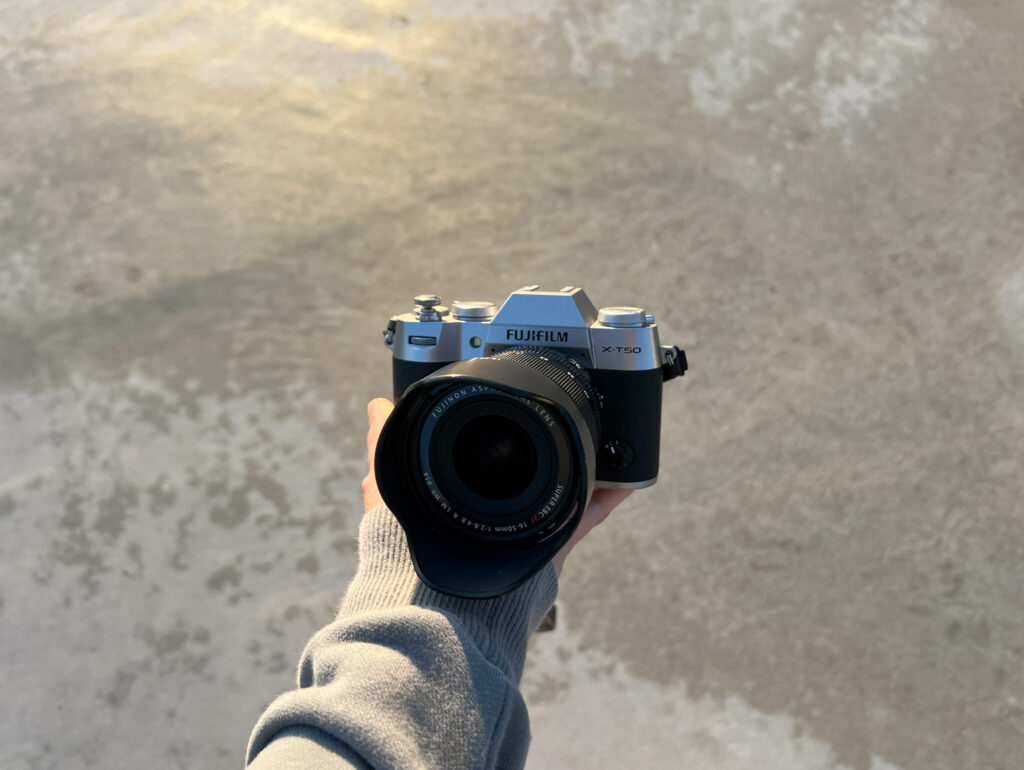
As I mentioned in my Fujifilm XT50 first impressions blog post, I think it really helps to be a natural problem solver when using this camera.
The Fujifilm X-T50 is such a cool camera, but it can also be a little confusing, especially if you’re switching from another brand or just starting.
At least, it was for me. Coming from a Sony camera with a PASM dial. Fujifilm’s approach took some getting used to. Some photographers might roll their eyes at that, but hey — this was my real experience.
Almost immediately, I ran into confusion trying to do things as simple as getting into a priority mode. So I started a running note in my Apple Notes app where I documented every little issue and its fix.
I figured there has to be someone else out there running into these same things. Since I have a blog, why not create a public list to help someone else troubleshoot faster?
Some of these problems are so simple they almost feel silly to write out, but I’m going to anyway, because if you’re new to Fujifilm or new to photography in general, they might save you time and frustration.
- Fujifilm X-T50 Common Problems and Solutions
- 1. Why isn’t my Fujifilm X-T50 in manual mode, even though I moved the aperture and shutter dials off Auto?
- 2. Why is my Fujifilm XT50 exposure meter reading 0 in manual mode, even after adjusting aperture and shutter?
- 3. Why isn't my Fujifilm XT50 focusing?
- 4. Why isn’t my flash firing on my Fujifilm X-T50 even though it’s open?
- 5. Why can’t I edit film simulation options in the menu on my Fujifilm camera?
- 6. Why can't I adjust my aperture on my command dial on my Fujifilm XT50?
- 7. How do I control shutter speed with the command dial on my Fujifilm camera?
- 8. How do I improve the focus on my Fujifilm X-T50?
- Closing thoughts
Fujifilm X-T50 Common Problems and Solutions
1. Why isn’t my Fujifilm X-T50 in manual mode, even though I moved the aperture and shutter dials off Auto?
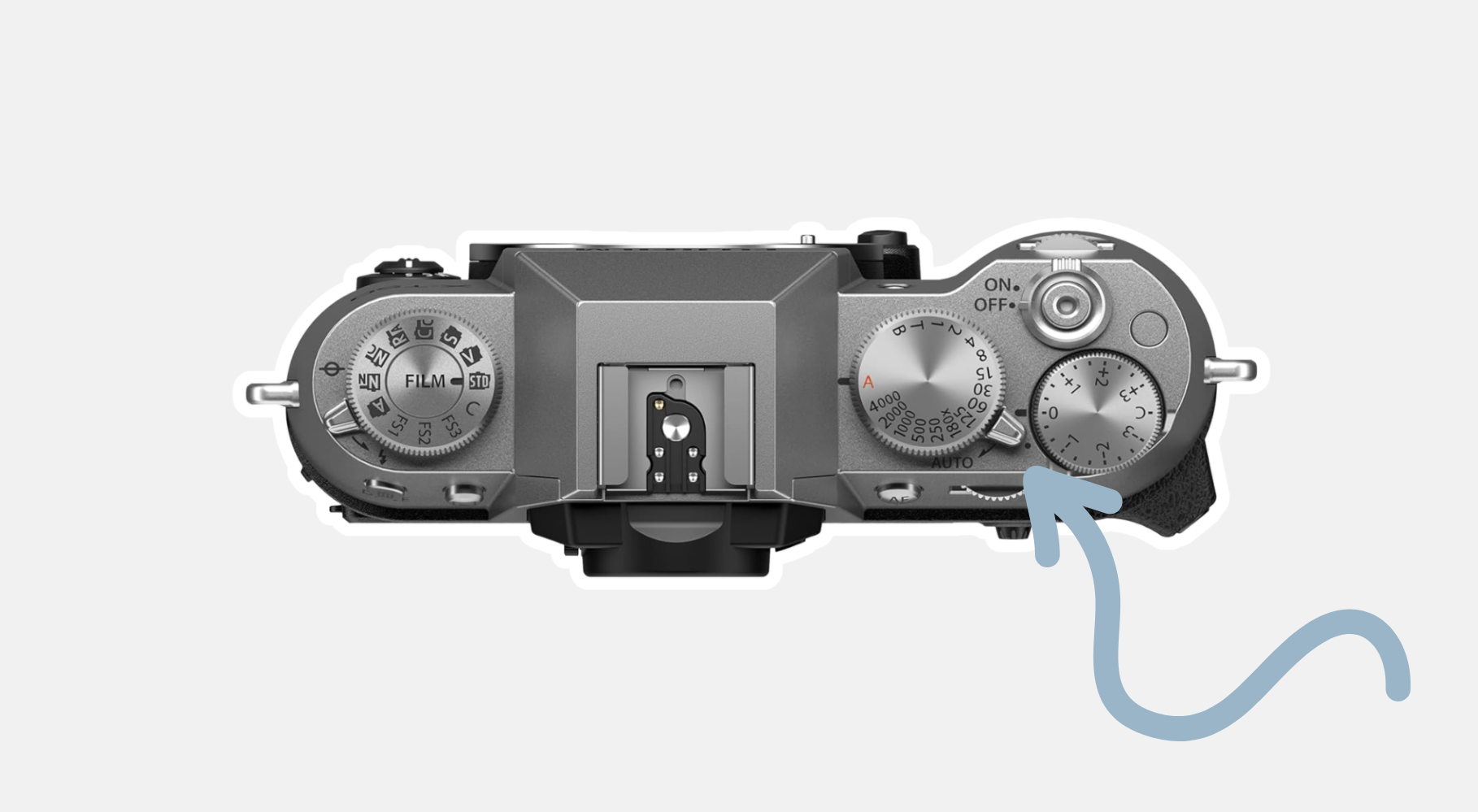
Answer: The automatic mode switch on the top of the camera might still be set to Auto. I know… It’s so simple, but this tripped me up while out shooting.
If your camera isn’t displaying the little M in the bottom-left corner of the screen, check that switch!
Oh, and if you’re new-ish to photography and stuck shooting on automatic mode, check out my self-paced 7-step program below!

2. Why is my Fujifilm XT50 exposure meter reading 0 in manual mode, even after adjusting aperture and shutter?
Answer: This happened to me when I first started shooting in manual. The X-T50 doesn’t have a dedicated ISO dial, so I set my ISO to the front command dial. At some point, I accidentally switched into an AUTO ISO mode, and couldn’t figure out why my exposure meter wasn’t changing.
So if your light meter is stuck at 0 in manual mode, check your ISO setting. It could be set to auto!
3. Why isn’t my Fujifilm XT50 focusing?
Answer: You may have accidentally bumped the focus switch on the front of the camera to M (Manual Focus).
There’s a tiny dial on the front right of the camera (when you’re looking at the lens) with options for AF-S (Single), AF-C (Continuous), and M (Manual). If it gets switched to M, your autofocus won’t work.
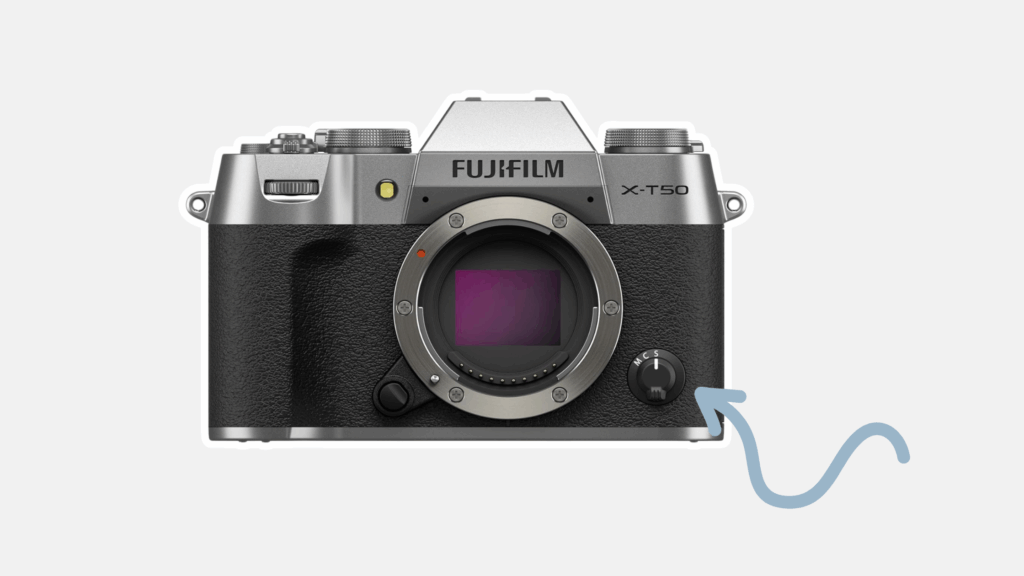
This happened to me on an 18-mile day while backpacking in New Zealand. I was exhausted, shooting from the hip, and didn’t realize the focus had switched. I lost about an hour’s worth of photos. Painful, but an easy fix once I spotted it.
4. Why isn’t my flash firing on my Fujifilm X-T50 even though it’s open?
Answer: There are a couple of reasons this could be happening from my experience.
Your camera might be set to electronic shutter, which disables flash. Switch to the mechanical shutter to use the flash.
I use electronic shutter 95% of the time because I love silent shooting, it’s great for street photography and quiet spaces. But if you’re using a flash, switch to mechanical. People will know you’re taking a picture anyway (hello, flash), so the shutter sound isn’t a big deal.
Two other possible explanations include (1) you could also have your flash turned off in your menu or (2) the drive mode you’re in could be preventing the flash from firing. When using the flash I always shoot in the single shot drive mode.
5. Why can’t I edit film simulation options in the menu on my Fujifilm camera?
Answer: You need to be out of Auto Mode to access some settings like film simulations. Flip the Auto Mode switch near the shutter speed dial to turn off Auto. Once you’re in manual or a priority mode, the film simulation options become editable.
Recommended read: Fujifilm XT50 Film Simulations and Recipes: How to Access, Customize, & Save
6. Why can’t I adjust my aperture on my command dial on my Fujifilm XT50?
Answer: Have you set your aperture to your command dial and tried pressing the front command dial to switch to aperture control and… nothing happens? Same here. I pushed it a dozen times, thinking it was broken or stuck… but of course, it wasn’t.
Assuming that you’ve already set the aperture to a spot on your command dial, here’s how to fix it.
Setup Menu → button/dial settings → aperture ring settings → change it from auto to command
Next, make sure your lens’s aperture ring is set to A (Auto). Once that’s done, pressing the command dial should let you adjust the aperture.
You should see a little half-circle icon above the setting on your screen that you’re controlling with the command dial.
Bonus tip: If you want to use a command dial to adjust film simulations, make sure the simulation dial is set to C. Then you can click the command dial again to cycle through it (again, assuming you’ve assigned it that way in your setup).
7. How do I control shutter speed with the command dial on my Fujifilm camera?
Answer: If you’re trying to control shutter speed using the rear command dial and it’s not working, here are potential solutions.
If you haven’t, first, go into your menu and assign the shutter speed setting to your command dial:
Menu → Setup Menu → Button/Dial Settings → Command Dial Settings → Set a command dial to control shutter speed
I use the rear dial, but you can use the front dial if you want.
Once that’s done, set your shutter speed dial on the camera to T. This allows you to access the full range of shutter speeds using your rear dial.
You can also use the rear command dial to make adjustments within a range if the shutter dial is set to a specific number.
For example, if the shutter dial is set to 500, you can fine-tune it between 1/320 and 1/800 using the dial.
8. How do I improve the focus on my Fujifilm X-T50?
Answer: Yeah… I hate to break it to you, but autofocus on Fujifilm isn’t the best. However, I have found some workarounds that make it better. And honestly, I have nothing to complain about now.
First, I went into my AF/MF menu and changed my focus settings.
Menu → AF/MF Settings → Release/Focus Priority → Switch from release to focus priority
Next, I switched to single-point autofocus — I’d set my focus point using the touchscreen or joystick for each shot. That helped, but it made one-handed shooting kind of a pain.
Eventually, I started using AF-C (continuous autofocus) with wide/tracking AF mode.
Here’s how I shoot with this set-up:
- Line up the little focus box where I want to focus.
- Half-press the shutter to lock focus.
- Recompose if needed.
- Then press fully to take the picture.
It’s not perfect, but it’s helped me shoot faster and with one hand when I need to.
Overall, I have found that these adjustments have made autofocus less frustrating!
Closing thoughts
As cool as the Fujifilm X-T50 is, with all the buttons on the outside of the camera, I’ve realized it’s extremely easy to accidentally bump a button and completely mess up your settings without noticing when you’re out shooting. It’s happened to me many times and has left me feeling frustrated.
But don’t worry, you’ll get the hang of it.
As frustrating as it can be, I absolutely love this camera for helping me slow down and become more intentional with my photography, but I don’t love it for being a dependable workhorse.
Maybe this will change over time, who knows! But in the meantime, I’ll continue to update this post as I run into new problems. Hope this helps!
Recommended read: How the Fujifilm X-T50 has changed my photography